
Jobber is a field service app built for the home-service trades. Fire protection runs on recurring inspection contracts, NFPA documentation, and repair revenue that starts with a deficiency list — and Jobber is built for none of those. This comparison goes point by point, with sources.
TL;DR: Jobber vs. Essential in 30 Seconds
- Jobber is not built for fire protection. Its own industries list covers 50+ trades, and fire protection isn't one of them. Essential is built for nothing else.
- Essential's inspection forms are fully customizable — NFPA templates included, plus any format your AHJ or customer asks for. Jobber gives you a generic checklist builder.
- Essential's team migrates your data for free.
- Essential is month-to-month, and office users are free.
- Essential fits fire protection businesses of every size, from one-truck shops to multi-branch operations.
Skip the reading — book a 30-minute demo →
Quick Comparison: Jobber vs. Essential
| Feature | Jobber | Essential |
|---|---|---|
| Built For | 50+ home and commercial service trades; no fire protection vertical | Fire protection businesses only |
| Inspection Forms | Generic checklists you build yourself — 100 per account, 10 images per form, Connect plan and up | Full NFPA template library (NFPA 10, 25, 72, 80, 96/UL 300, 101) plus fully custom forms |
| Asset Records | No per-building device register; published "asset tracking" is GPS hardware for your own vehicles | Every device on every property with inspection history attached; AI imports asset lists from prior reports, even a competitor's PDF |
| Inspection Due Dates | Recurring job scheduling; reviewers call multi-visit setups cumbersome | Due dates update automatically from completed work; custom service intervals for rare services |
| Deficiency Workflow | None advertised; generic quote follow-up automations | Deficiencies tied to each asset flow into an AI-drafted quote with every line item cited to its source |
| Mobile App | Home-services field app | Native iOS and Android, works completely offline, built for a tech's first inspection on day one |
| Reporting | Reviewers describe reporting as fragmented and limited | 28 pre-built reports plus live revenue, A/R, and quote win-rate dashboards |
| Pricing Model | Per-user plans: Core $49/mo (1 user) to Plus $499/mo (15 users); extra users $29/mo | Month-to-month; only pay for technician users — office users free |
| Implementation | Self-serve setup | Free, white-glove migration handled by the Essential team |
About the Two Platforms
Jobber
Jobber is a field service platform for home and commercial service businesses: quoting, scheduling, invoicing, and payments for trades like lawn care, cleaning, plumbing, and painting. Its industries page lists more than 50 trades, and fire protection isn't among them — the fire-safety industry URL on Jobber's site returns a 404. Inspection work runs through its Checklists feature: short-answer, dropdown, checkbox, image, and signature fields you assemble yourself, capped at 100 checklists per account and 10 images per form, available on the Connect plan and up. Jobber rates 4.6/5 across more than 1,400 reviews on Capterra.
Essential
Essential is a modern, all-in-one platform built specifically for fire protection contractors. It was made by people from inside the fire protection industry — the founder grew up in a family that owns a fire and life safety business, and built Essential around how those businesses actually run — so the platform is organized around the inspection schedule.
Inspections, scheduling, quoting, invoicing, and customer communication run in one system. The AI handles office work a generalist app leaves to you: quotes draft themselves from an inspection's deficiencies and your pricebook with every line item cited to its source, draft invoices appear the moment a job is completed, and inspection due dates update automatically based on completed work. Implementation is free, data migration is handled by the Essential team, pricing is month-to-month with office users free, and US-based support answers in under 2 minutes on average.
Feature-by-Feature Comparison
Inspection Forms and NFPA Reporting
Jobber has no NFPA inspection forms. Inspection work runs through Checklists — a form builder with short-answer, dropdown, checkbox, image, and signature fields. Per Jobber's own help documentation, accounts are capped at 100 checklists and 10 images per form, and the feature starts on the Connect plan. The output of a completed checklist is a generic record attached to a job, not a standardized report your AHJ recognizes.
Essential ships a full library of NFPA-compliant inspection templates covering all major fire protection systems — fire extinguishers (NFPA 10), fire sprinklers (NFPA 25), fire alarms (NFPA 72), fire doors (NFPA 80), kitchen suppression systems (NFPA 96/UL 300), and emergency lights (NFPA 101) — and every report template is fully customizable, so you control exactly how your reports look and read. Property and asset details carry forward from previous visits, so technicians enter results instead of retyping building data. Barcode scanning works directly from the phone with no extra hardware, deficiencies are recorded with comments and tied to the specific asset, and techs review the finished report on the spot before it goes to the back office.
Verdict: Essential wins on compliance documentation, and it isn't close. Jobber gives you a checklist builder: you create and maintain every form, and the output still isn't an NFPA report. Essential's NFPA reports exist before your first inspection and print ready for any inspector.
Asset and Equipment Records
Jobber has no per-building device register. Its published "asset tracking" is FleetSharp GPS hardware for tracking a contractor's own vehicles — useful for fleet management, unrelated to the extinguishers, panels, and sprinkler systems at your customers' properties. Site equipment records are limited to custom fields you define on clients and properties.
Essential keeps every device on the building record with its inspection history attached. Run the math on a 300-device fire alarm inspection: NFPA 72 documentation records results device by device, and that history has to survive year over year, because your AHJ and your renewal revenue both depend on it. In Essential, every initiating device, panel, and horn strobe lives on the property with its history, and next year's tech starts from a populated record — our guide to NFPA 72 inspection frequencies shows how much scheduling detail rides on those records. Getting there is fast even if your records are a mess today: drop in last year's inspection report, even a competitor's PDF, and Essential's AI extracts every asset into an editable review table. Approve it, and the building is ready to inspect. In the field, techs snap photos of nameplates or say what they see, and Essential fills in the fields, flagging anything it's unsure about.
Verdict: Essential wins. It keeps a device-by-device record with history on every building; Jobber has no equipment register at all. Repairs, renewals, and AHJ documentation all trace back to that record.
Recurring Inspection Scheduling
Jobber schedules recurring jobs, but its own reviewers say fire-style cadences are clumsy in it. One Capterra reviewer "found it to be a little cumbersome when setting up reoccurring jobs (5 applications) spaced out over the year." Another notes Jobber "doesn't track service club memberships very efficiently" — the closest thing it has to a recurring inspection agreement.
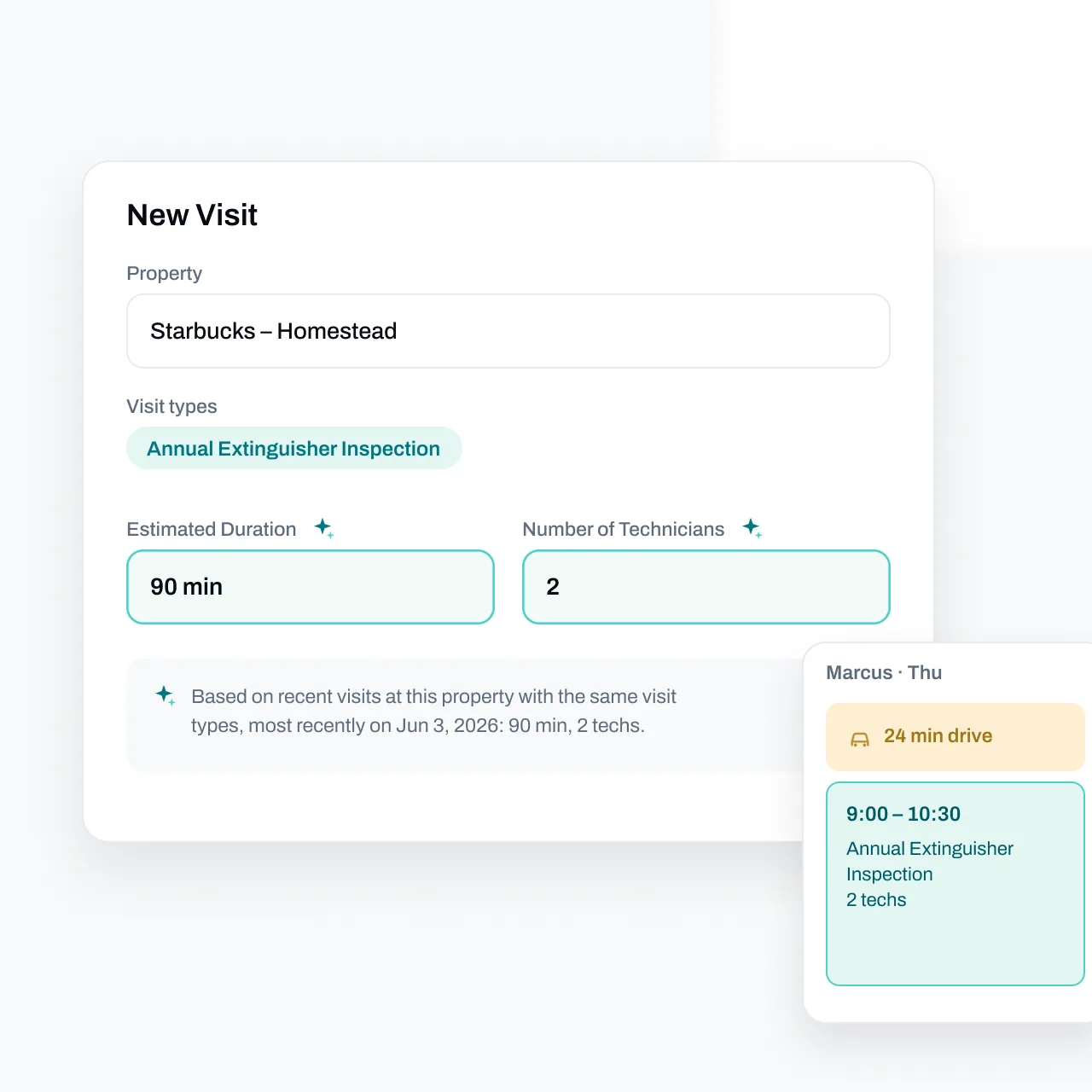
Essential was built around the inspection calendar. Due dates update dynamically based on completed work, so when a service happens earlier or later than planned, the next due date recalculates on its own. Custom service intervals cover the specialized services that don't come up every visit. The Backlog lets you schedule many jobs in a single session while building efficient routes for each technician's day, with commute times estimated from Google Maps traffic data for the specific day and time of each job. Essential even pre-fills visit duration and technician count from past visits at that property — hover the sparkle and it shows exactly why it suggested what it did. Before the visit, automated outreach goes out from your own email address to confirm service and gather access information, with every attempt logged and timestamped.
Verdict: Essential wins on recurring work. Due dates update themselves from completed work, and every customer touch is logged; Jobber leaves both to your office. A missed due date is a compliance lapse and lost renewal revenue.
From Deficiency to Repair Quote
Jobber advertises no deficiency workflow — there's no concept of a failed device flowing into a repair quote. Quote follow-up automations exist, but the quote itself starts from a blank page, and connecting it back to what the tech found on site is manual.
Essential treats the deficiency list as the start of the sales pipeline, because in a fire shop it is. Technicians record deficiencies with comments and internal notes, each tied to the specific asset. Back at the office, you pick a quote template, add a sentence of instructions, and Essential drafts the whole quote — pulling from the property, the inspection's deficiencies, and your pricebook. Every line shows why it was added, with the source assets cited, and nothing is sent until you review and approve. You can write custom pricing rules — like instructions for a new employee — for discounts, surcharges, and item selection, and Essential applies them consistently, generating quotes up to 10x faster than manual methods. Automated email and SMS follow-ups chase unsigned quotes, every touch is logged, and an accepted quote converts to a scheduled job in one click. Techs can also build a quote in the field from the pricebook and collect a signature on their device before they leave the lot.
Verdict: Essential wins by the widest margin here. Jobber has no deficiency pipeline. Essential turns a failed asset into a priced, cited quote the same day, then follows up until it's signed — and deficiency repairs are the highest-margin revenue in the business.
Technician Mobile App
Jobber's mobile app is built for its home-service trades: schedules, quotes, invoices, and payments on the go.
Essential's technician app is native on iOS and Android, phones and tablets, and works completely offline — inspections in basements, mechanical rooms, and dead zones keep moving, and everything syncs automatically when a connection returns, so no work is ever lost. It's designed so a technician can open the app on day one and complete their first inspection without a training session: every visit opens with the property details, assets, and past inspections, screens show only the fields that matter for the job in front of you, and a barcode scan pulls up the correct device instantly. Techs see their schedule up to 30 days out, and, if the office allows it, can pick open backlog visits near them and book their own day. They can even take tap-to-pay card payments on site with no extra hardware.
Verdict: Essential wins in the field. The app is native, fully offline, and usable on day one without a training session. That's training time saved and no lost inspection data in dead zones.
Invoicing, Collections, and Reporting
Jobber covers invoicing and payments for its service trades. Reporting is where its own users push back: "reporting feels more fragmented than it should be, and it takes extra time," one Capterra reviewer writes; another is blunter: "The lack of reporting is disappointing. It could be so much better."
Essential drafts the invoice for you the moment a job is completed, using job details, technician summaries, parts, and labor entries — and every unbilled job is tracked with a task reminder so revenue doesn't slip. Prior quotes translate to invoices in one click, automated collections chase overdue balances, and customers with outstanding invoices are flagged before you schedule them more work. Everything syncs cleanly with QuickBooks Online and QuickBooks Desktop. On the reporting side, Essential ships 28 pre-built reports across financials, job costing, sales, and field operations — ready on day one, no spreadsheet exports — plus live dashboards for revenue, outstanding A/R, and quote win rate. Job costing shows revenue, labor, parts, and profit side by side on every job, computed from clocked hours and the parts techs actually used, with margin reading green, amber, or red at a glance.
Verdict: Essential wins the money workflow. Invoices draft themselves, collections run automatically, and 28 built-in reports show A/R and job margin without spreadsheets. Jobber's own reviewers call its reporting limited.
Data Migration
Switching software is only painful if the migration is painful.
Essential handles data migration for you — for free. Customer records, asset histories, recurring inspection schedules, and open quotes are imported by the Essential team, validated, and ready to use before you go live. Coming from a platform with no fire asset records, the AI does the rebuilding: drop in last year's inspection reports, even a competitor's PDF, and every asset lands in an editable review table for your approval. The process scales with the size of your business — smaller teams are typically up and running quickly, and larger operations are migrated in a structured, phased rollout. Weeks, not months.
Verdict: Essential removes the biggest rollout risk — a bad migration is the #1 reason software switches fail — and does it for free. The size of your data set doesn't change the price.
Ready to see how Essential migrates your data? Book a 30-minute demo →
Pricing and Implementation
Jobber Pricing
Jobber's published plans run from Core at $49/month for one user to Plus at $499/month for up to 15 users, with additional users at $29/month; Checklists arrive on the Connect plan at $139/month. It's a per-user model, so every office hire adds to the bill. The bigger cost for a fire shop isn't the subscription. It's building and maintaining the compliance layer yourself: inspection forms, asset records in custom fields, deficiency follow-up stitched together from generic automations.
Essential Pricing
Essential's pricing is flexible and month-to-month, with no long-term contracts or large upfront fees. You only pay for technician users — office users are free — and there are no minimum user requirements and no surprise per-technician tier jumps as you grow. Implementation is free with white-glove onboarding included, and the Essential team migrates your data at no charge.
Verdict: Office users are free in Essential, so adding admin staff costs nothing — and the platform is already complete for fire work. Jobber charges per user. And no Jobber plan includes the NFPA reporting and asset layer a fire shop has to have — you build that yourself, forever.
Customer Support
Jobber staffs support across the 50+ trades it serves. Essential's support team is US-based, available 8 AM - 9 PM ET, answers in under 2 minutes on average, and is trained specifically on fire protection workflows — when your question is how to set up an NFPA 25 quarterly with a five-year internal on the same system, the person answering knows what that is. Support stays hands-on from implementation through daily operations.
Verdict: Essential's support is faster and knows the trade: under 2 minutes to a person, 8 AM - 9 PM ET. In inspection season that's an operational advantage, not a nicety.
What Real Users Say
Jobber User Feedback
Jobber rates 4.6/5 across more than 1,400 Capterra reviews. The complaints that matter to a fire shop are about recurring contracts and reporting:
- "...found it to be a little cumbersome when setting up reoccurring jobs (5 applications) spaced out over the year." — Capterra review (owner, environmental services)
- "reporting feels more fragmented than it should be, and it takes extra time" — Capterra review
- "The lack of reporting is disappointing. It could be so much better." — Capterra review (COO)
Essential User Feedback
"For years, we used an Excel spreadsheet to track inspections and a whiteboard for technician schedules. As we got busier, we knew we needed a better way to operate. After looking at many options, we chose Essential. It was the right choice for us. Essential is nice to use, keeps us organized, and automates things like sending job reminders and emailing customers before inspections are due. It has reduced mistakes and made our work easier."
— Roger Lu, Owner, SAFCO
"Before Essential, we had 4 employees that were overwhelmed with manual work, especially with trying to track and schedule upcoming inspections. Essential's automated email outreach and portal allows customers to easily communicate with us. This program has made it easy to receive approvals effortlessly."
— David Pulvers, Owner, All County Fire
"Essential has streamlined our inspection workflow dramatically. What used to take us hours now takes minutes."
— Capterra review
Which Platform Is Right for You?
The honest answer: Essential is the right choice for fire protection businesses at every size. Here's why.
Small and growing fire protection businesses choose Essential because:
- Free implementation and free data migration — no five-figure onboarding bill
- Month-to-month pricing, office users free, no minimum user count
- A clean, simple UI a new technician can learn in an afternoon
- US-based support that answers in under 2 minutes — not a ticket queue
Mid-sized and established businesses choose Essential because:
- AI-powered quoting, invoicing, and customer outreach scale across hundreds of jobs per week without adding admin headcount
- Fully customizable inspection reports and unlimited asset types handle complex, high-volume operations
- The Essential team handles the migration, so your office isn't pulled off billable work for months
- No surprise per-technician price tier jumps as you grow
Multi-branch and high-growth businesses choose Essential because:
- Centralized scheduling, dispatch, and inventory across locations
- Phased migration for complex data sets, without the months-long disruption of traditional onboarding
- A fire protection specialist, not a generalist field service platform
- Continuous platform updates based on customer feedback — not annual release cycles
Essential is built so that the larger you grow, the more time the platform gives back.
The Bottom Line
For fire protection businesses of every size — from small teams to multi-branch contractors — Essential is the better platform in 2026.
You get NFPA inspection reports that exist before your first visit. Asset records with history on every building, importable from last year's PDFs. Due dates that update themselves from completed work. AI that drafts quotes from the deficiency list and your pricebook, with every line cited. Free implementation and free white-glove migration. Month-to-month pricing with office users free. US-based support that answers in under 2 minutes. And a technician app that works offline from day one.
Jobber's own materials say it plainly: 50+ industries without fire protection, checklists instead of NFPA reports, and vehicle GPS instead of building asset records. A fire shop on Jobber spends its time rebuilding the compliance layer Essential already ships. Our ServiceTrade and ServiceTitan comparisons reach the same conclusion from the other direction: fire protection work rewards a platform built for it.
Frequently Asked Questions
Does Jobber have fire inspection forms?
No. Jobber offers a generic checklist builder (100 checklists per account, 10 images per form) with no NFPA formats, per its own help documentation. Essential ships NFPA 10, 25, 72, 80, 96/UL 300, and 101 templates plus fully custom forms.
Can Jobber track fire protection equipment by building?
Not as a product feature. Its published asset tracking is FleetSharp GPS hardware for a contractor's own vehicles; customer-site records are limited to custom fields. Essential keeps every device on the property record with inspection history — and its AI can rebuild an asset register from a prior inspection report, even a competitor's PDF.
Is Jobber cheaper than Essential for a fire protection business?
Jobber publishes per-user plans from $49 to $499 per month. For a fire shop the real comparison is the subscription plus the compliance layer you'd build and maintain yourself: inspection forms, asset records, deficiency follow-up. Essential is month-to-month, office users are free, and implementation and data migration are included at no cost.
Can Essential handle all of our service lines?
Yes. Essential supports fire extinguishers, fire alarms, fire sprinklers, fire doors, kitchen suppression systems, and emergency and exit lights — with NFPA-aligned inspection forms for each.
Can Essential migrate our data from Jobber?
Yes. Migration is free and handled by the Essential team — customers, sites, devices, and service history move for you, so you can switch without re-entering data.
Still have questions? Book a 30-minute demo and ask us live →
This article represents independent editorial opinions. Product details and pricing are current as of August 2026. All trademarks belong to their respective owners. Essential is compared with Jobber based on publicly available information, including Jobber's published pricing, help documentation, and public review platforms. No statements should be interpreted as factual claims of product defects or service failures.