


“Failed device, second floor” leaves the office guessing at the location, the fault, and whether it was repaired. A useful fire inspection report gives those details to someone who wasn't on the job.
For contractor inspection, testing, and maintenance reports, start with the form required for the system and jurisdiction. Use the fields below to review it. A fire department's occupancy inspection can use a different form and process.
Choose the required form before the visit
San Diego's report preparation rules, for example, require typed PDFs submitted within 14 days of work completion, completion of all fields, and signatures from the required parties. The city specifies the current NFPA 72 form for fire alarms and AES 20 with AES 10 for kitchen suppression. Those are local requirements.
Record each property's authority having jurisdiction, accepted form, submission method, deadline, and responsible contact. Confirm whether separate systems need separate reports before dispatch.
Fire inspection report example: an NFPA 72 format
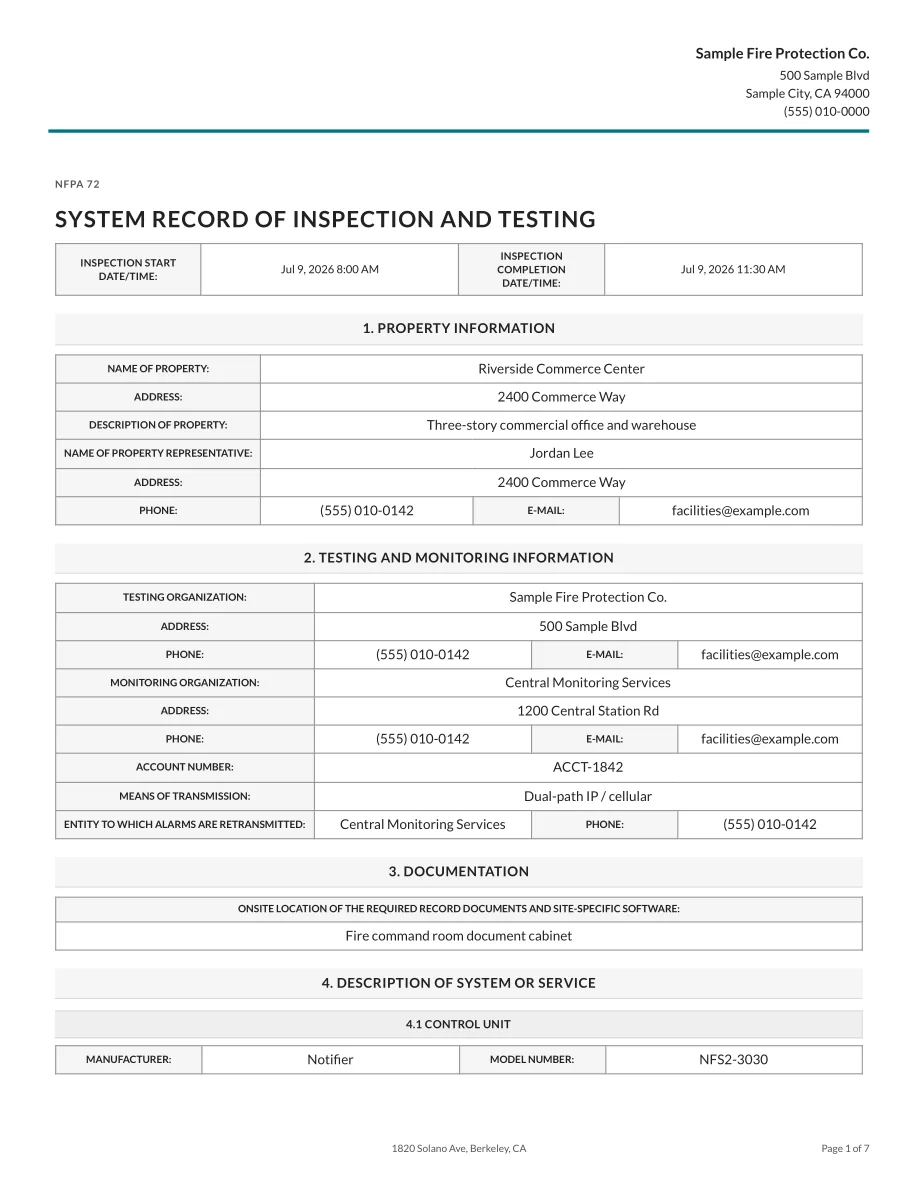
This is the first page of a fire alarm report from Essential's inspection report template library, rendered with sample data. It shows the inspection start and completion times, property contacts, testing and monitoring organizations, document location, and control-unit details. The full report needs the device results and findings discussed below.
Identify the property, system, and people
A street address can identify a campus with several buildings and systems. Include the building or tenant, system identifier, and location details that distinguish this report from the next one.
The report review should cover:
- Customer and property name, service address, and building or suite.
- Owner or responsible representative and contact details.
- System type, system ID, and the equipment details the applicable form requests.
- Inspection date, visit type, and the standard and edition used.
- Contractor, technician identity, and required credentials or signatures.
- Job or report number that connects the visit to later corrective work.
Keep the report number stable when issuing a correction. Add a revision identifier or date so the customer can tell which version supersedes the first.
Show what was inspected and tested
Use totals to reconcile the inventory, then check the individual results.
Give each asset a location and identifier, then record the applicable visual inspection or test, its result, and any required measured value with units. Keep visual checks separate from functional tests. If the form needs the test method or instrument details, capture them in the field.
For an alarm job, “smoke detectors passed” can hide several different activities. Our fire alarm inspection workflow guide covers the broader visit. Your report should make clear which activities this visit actually completed.
Use separate outcomes for passed, failed, not tested, and not applicable where the accepted form permits them. Explain the exceptions. A locked room containing an untested device doesn't become “N/A” because the technician couldn't enter it.
See how the technician's device results appear in the generated report in a 30-minute demo. We'll show the field entry and generated report together so you can check which details your office would receive.
Write deficiencies the next crew can act on
Suppose a technician finds a painted smoke detector in Room 214 during a visual inspection. A useful entry would identify the detector address and room, describe the paint, attach a photo, record which tests were or weren't completed, and state the proposed corrective work. If the technician cites a code provision, it should match the standard and edition used for the job.
That gives the office enough information to quote the work and send a technician to the right device. The separate Essential product example below shows a functional-test failure recorded beside the device location, description, and photo.
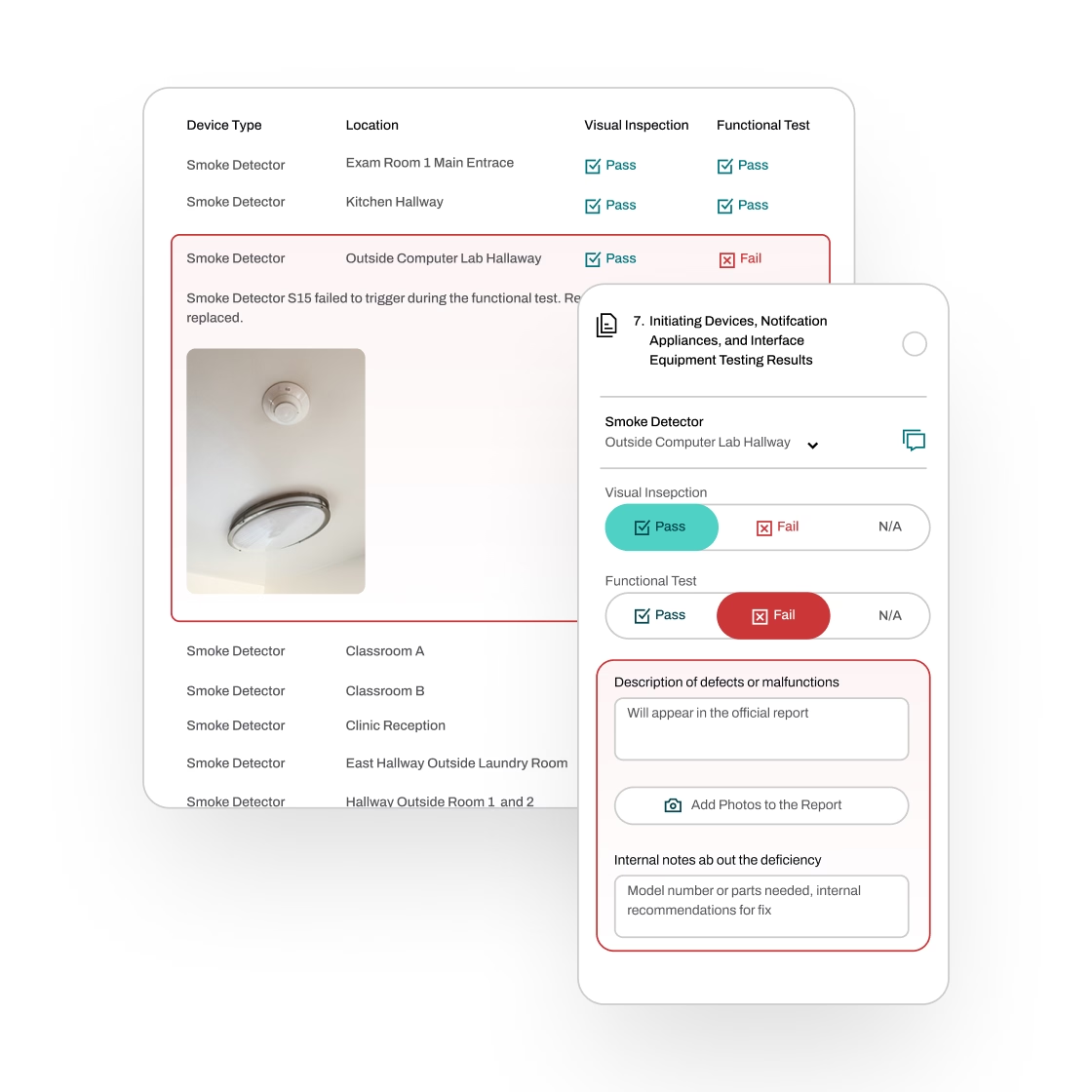
Keep the observation separate from the recommendation and repair status. “Replacement quoted” doesn't mean “replaced.” After corrective work, retain the original finding and attach the dated repair and retest record.
Use the applicable impairment process when a finding meets that threshold. San Diego requires immediate impairment reporting; a routine report sent later doesn't satisfy that requirement.
Document the limits of the visit
If the scope was partial, name the omitted work, explain why it wasn't completed, and state the next step. Put the limitation in the summary and beside the affected entries.
Consider an annual alarm test with two tenant spaces inaccessible. The office needs an unresolved-work list and an access contact to schedule completion. A report marked complete without those details gives the scheduler no reason to arrange the return.
The same discipline applies to records inherited from another contractor. Carry forward asset identity where you've verified it. Don't carry forward last year's passing result as this year's observation.
Finish the report while the technician can still check it
Before delivery, reconcile the asset count, scan for blank results, and check that each deficiency has a location and disposition. Confirm the dates and signatures. Review the report's overall status against its unresolved findings.
Then deliver it through the required channel, save the submission confirmation, and track any rejection or request for correction. Set record retention using the applicable standard, jurisdiction, and contract rather than a single default for every service line.
Essential's mobile inspection reports connect field findings to the asset and let technicians review the generated report on site. They're built into the same fire inspection software that handles scheduling, deficiency quotes, and invoicing. In a 30-minute demo, follow one failed device from the technician's entry to the customer report. We can use a sample report, or compare the workflow with a form your office uses today.