
Simpro is a multi-trade job management platform — electrical, plumbing, HVAC, security, and fire protection on one system. Essential is fire protection software and nothing else. This comparison works through what that difference means in practice: which fire workflows ship in the box, which arrive as add-ons and integrations, and what each costs you in fees, contract terms, and rollout time.
TL;DR: Simpro vs. Essential in 30 Seconds
- Simpro serves five trades at once. Essential does fire protection, period.
- Essential's inspection forms are fully customizable — NFPA templates included, plus any format your AHJ or customer asks for. Simpro routes NFPA form libraries through a partner integration.
- Simpro's own implementation guide says to plan for around 60 days — and to expect a learning curve.
- Essential's implementation and data migration are free, done by the Essential team, in weeks.
- Essential is month-to-month, and office users are free. Simpro's master terms auto-renew and don't refund.
Skip the reading — book a 30-minute demo →
Quick Comparison: Simpro vs. Essential
| Category | Simpro | Essential |
|---|---|---|
| Built For | Electrical, plumbing, HVAC, security, and fire protection trades | Fire protection businesses only — from small teams to multi-branch contractors |
| Fire Inspection Forms | Fire pages promise compliance reporting without naming NFPA; NFPA form libraries route through its Inspect Point marketplace integration | NFPA template library named by code (NFPA 10, 25, 72, 80, 96/UL 300, 101) plus fully custom forms — included |
| Asset Testing & Due Dates | Asset database with barcode/QR scanning and test readings; service levels and testing frequencies run through the Maintenance Planner add-on, listed for separate purchase | Per-device records and histories included, with due dates that update dynamically from completed work |
| Pricing & Contract | Initial setup fee confirmed in Simpro's own FAQ; master terms renew automatically, payments non-refundable, 30 days to export data after termination | Month-to-month, cancel anytime; only technicians are paid users — office users free |
| Implementation | Simpro's guidance: "plan for around 60 days," with a dedicated consultant, and "you should expect a learning curve" | Free, white-glove, handled by the Essential team — weeks, not months |
| Ease of Use | Capterra: 4.0/5 overall, 3.7 for ease of use; recurring complaints cite the learning curve and mobile app friction | A technician can complete their first inspection on day one without a training session |
| Support | Global platform serving multiple countries | US-based, 8 AM–9 PM ET, under 2-minute average response |
About the Two Platforms
Simpro
Simpro is a Brisbane-founded job management platform now serving contractors in multiple countries across electrical, plumbing, HVAC, security, and fire protection. Its fire protection pages describe an asset database with test readings and attachments, barcode and QR scanning to pull a device's history in the field, automated job creation for preventive maintenance, and a defect-management module that carries a failed device from identification through quote to fix with an audit trail. A Honeywell CLSS integration passes defects recorded by connected fire panels into quoting. Two details matter for a fire buyer: service levels and testing frequencies run through Maintenance Planner, listed on Simpro's pricing page under add-ons available to purchase, and for NFPA form libraries Simpro's marketplace points to its Inspect Point integration — a second subscription running alongside.
Essential
Essential is made by people from inside the fire protection industry — the founder grew up in a family that owns a fire and life safety business, and built Essential around how those businesses actually run. Everything a fire contractor runs on is the core product, not an add-on: inspection management with NFPA-compliant templates, scheduling, AI quoting, invoicing and collections, a customer portal, dashboards with 28 pre-built reports, job costing, timecards, and a technician app built for day-one use. Every AI surface ends with a human decision — nothing is applied or sent until someone on your team approves it.
Feature-by-Feature Comparison
Fire Inspection Forms and Compliance Reporting
Simpro's fire pages promise easier compliance reporting but don't name NFPA standards. For NFPA form libraries, its marketplace routes buyers to the Inspect Point integration, and its Digital Forms add-on is priced separately on the pricing page.
Essential ships the forms as the product: a full library of NFPA-compliant templates named by code — fire extinguishers (NFPA 10), fire sprinklers (NFPA 25), fire alarms (NFPA 72), fire doors (NFPA 80), kitchen suppression (NFPA 96/UL 300), and emergency lights (NFPA 101) — plus fully customizable report templates, so you control exactly how your reports look and read for every customer and AHJ. Property and asset details carry forward from previous visits, techs review the finished report on site before sending it, and deficiencies land tied to the specific asset with comments and internal notes.
Verdict: Essential gives you the NFPA report your AHJ expects on day one, at no extra line item. On Simpro you assemble that first: base platform, add-on, partner subscription.
Asset Testing and Inspection Due Dates
Simpro's fire pages describe an asset database with test readings and attachments, barcode and QR scanning to pull device history in the field, and automated job creation for preventive maintenance. The service levels and testing frequencies behind that automation run through the Maintenance Planner add-on.
Essential includes per-device records and histories for every asset type you service, with no module to add. The due-date engine is the biggest difference: inspection due dates update dynamically based on completed work, so a sprinkler annual done three weeks early recalculates the next one automatically, and custom service intervals track the specialized services that don't come up every visit. Barcode scanning runs from the technician's phone with no extra hardware, and new buildings come online fast: drop in last year's inspection report, even another platform's PDF, and Essential's AI extracts every asset into an editable review table you approve.
Verdict: Essential recalculates every next due date from the work actually completed, with no add-on to buy. That's what keeps a 300-building portfolio from drifting out of compliance.
Deficiencies to Quotes
Simpro's defect-management module carries a failed device from identification through quote to fix with an audit trail, and the Honeywell CLSS integration feeds panel-recorded defects into quoting.
Simpro's module routes the defect to a quote. Essential writes the quote. Pick a template, add a sentence of instructions, and the AI drafts the whole thing, pulling from the property, the inspection's deficiencies, and your pricebook. Every line shows why it was added, with the source assets cited, and nothing is sent until you review and approve. Custom rules — written like instructions for a new employee — apply your discounts, surcharges, and item selection consistently, which is how quotes go out up to 10x faster than manual methods. Unsigned quotes get automated follow-ups, logged and timestamped, with a task created if several go unanswered; accepted quotes convert to scheduled jobs in one click; and techs can build and send a quote from the truck using the same pricebook.
Verdict: Essential writes the quote; Simpro's module routes it. The hours between "tech failed eleven devices" and "customer has a quote" are where repair revenue leaks — Essential cuts them to a review and an approve.
Scheduling and Dispatch
Simpro provides scheduling and job management across its five trades, including the automated preventive-maintenance job creation described above.
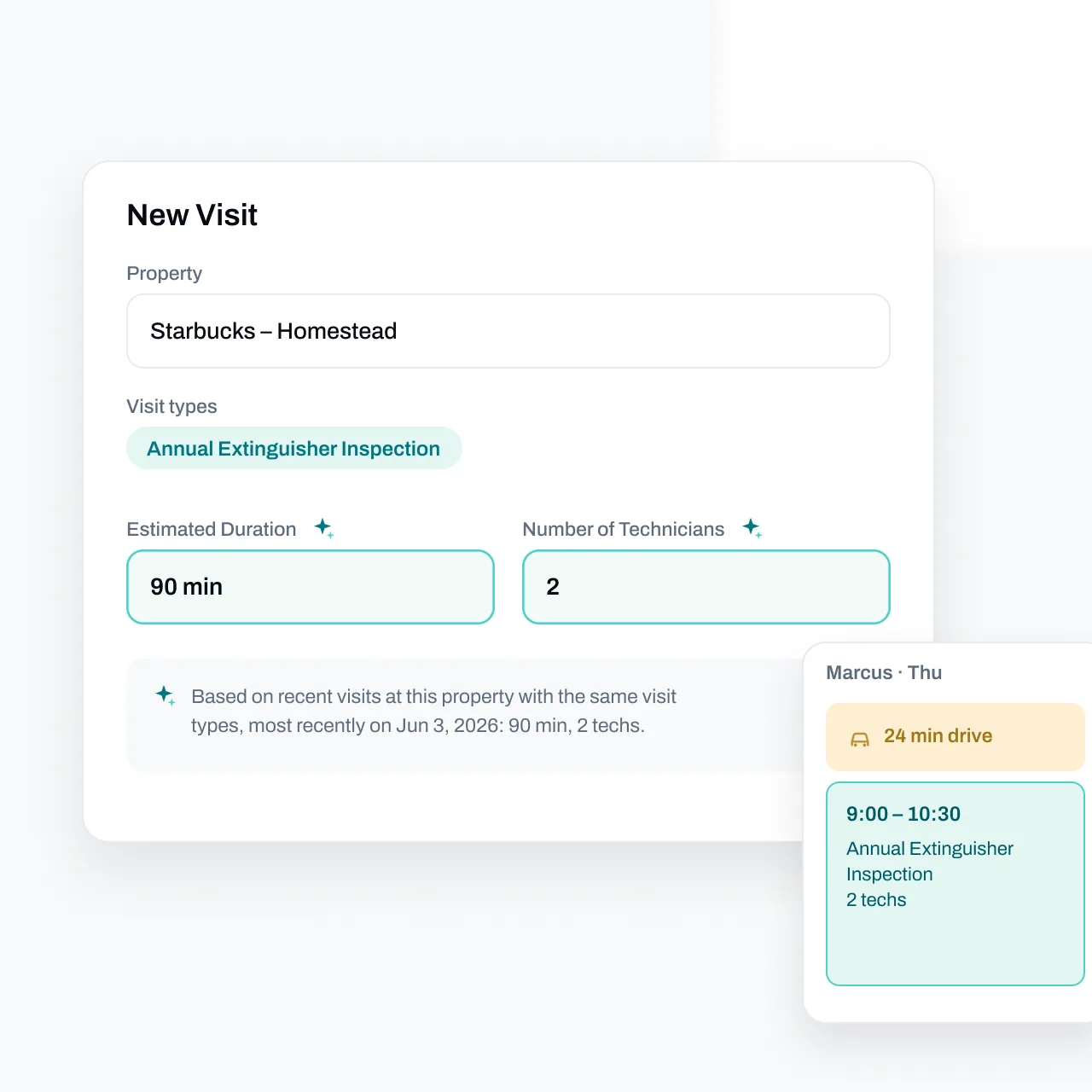
Essential's calendar does the dispatch math for you. Real drive times from Google Maps traffic data — for the specific day and time of each job — stack onto the schedule, the Backlog books many jobs in one session while building efficient routes for each technician's day, and AI pre-fills visit duration and technician count from past visits at that property, with the reasoning shown on hover. Appointment reminders go out by email, text, or both, each logged and timestamped. The office watches progress live as techs clock in and out, multi-branch operations get centralized scheduling, dispatch, and inventory across locations, and — if you allow it — techs can book nearby open backlog visits onto their own schedule.
Verdict: Essential cuts windshield hours and fills tech days — drive-time math and backlog routing do the dispatcher's hardest work automatically.
Mobile App and Ease of Use
Simpro's own implementation guide says it plainly: "you should expect a learning curve." On Capterra, Simpro averages 4.0/5 overall with 3.7 for ease of use, and the recurring complaints are the learning curve and mobile app friction.
Essential is designed so a technician can open the app on day one and complete their first inspection without a training session — screens show only the fields that matter for the job in front of them. The native iOS and Android app works completely offline, so basement and riser-room inspections keep moving, and everything syncs automatically when connectivity is restored; no work is ever lost. Techs see their schedule up to 30 days out, every visit opens with property details, assets, and past inspections, updates flow to the office in real time, and parts logged on the work order update inventory as they're used. Office staff get the same treatment: quoting, invoicing, and scheduling workflows laid out in the order you actually do the work.
Verdict: Essential's app works for a tech on day one. Simpro tells you to expect a learning curve. The gap between those two is billable time.
What Reviewers Say
Simpro User Feedback
On Capterra, Simpro holds a 4.0/5 overall average with ease of use at 3.7, and the cons repeat two themes: the learning curve and mobile app friction. Simpro's own implementation guide sets the same expectation — "plan for around 60 days," with a dedicated consultant, and "you should expect a learning curve."
Essential User Feedback
"For years, we used an Excel spreadsheet to track inspections and a whiteboard for technician schedules. As we got busier, we knew we needed a better way to operate. After looking at many options, we chose Essential. It was the right choice for us. Essential is nice to use, keeps us organized, and automates things like sending job reminders and emailing customers before inspections are due. It has reduced mistakes and made our work easier."
— Roger Lu, Owner, SAFCO
"Before Essential, we had 4 employees that were overwhelmed with manual work, especially with trying to track and schedule upcoming inspections. Essential's automated email outreach and portal allows customers to easily communicate with us. This program has made it easy to receive approvals effortlessly."
— David Pulvers, Owner, All County Fire
"Essential has streamlined our inspection workflow dramatically. What used to take us hours now takes minutes."
— Capterra review
Data Migration
Essential's migration is free and done for you. On Simpro, migration is part of what the setup fee pays for.
Per Simpro's own pricing FAQ, the setup fee covers onboarding, training, and data migration. Its master terms renew automatically, state that payments aren't refundable, and give you 30 days to export your data after termination.
Essential handles data migration at no charge. Customer records, asset histories, recurring inspection schedules, and open quotes are imported by the Essential team, validated, and ready to use before you go live. Smaller teams are typically up and running quickly; larger, more complex operations are migrated in a structured, phased rollout without the months-long disruption traditional platforms require. And because it's month-to-month, you can leave anytime — no auto-renewal to catch, no sunk setup fee to justify staying.
Verdict: A bad migration is the #1 reason software rollouts fail. Essential removes the risk twice — the migration is free and done for you, and the contract never locks you in with it.
Ready to see how Essential migrates your data? Book a 30-minute demo →
Pricing and Implementation
Simpro
Simpro's pricing page FAQ answers the setup-fee question directly: "Yes, there's an initial setup fee," covering onboarding, training, and migration. Maintenance Planner and Digital Forms are listed under add-ons available to purchase, and the implementation guide advises planning for around 60 days with a dedicated consultant.
Essential
Essential's pricing is flexible month-to-month with no long-term contracts and no large upfront fees. Only technicians are paid users — office users are free — there are no minimum user requirements, and no surprise per-technician tier jumps as you grow. Implementation and historical data migration are included at no charge, and deployment scales to your team: weeks, not months.
Verdict: Essential starts with free implementation, includes the fire workflows, and bills month to month. Simpro starts with a setup fee, add-on purchases, and a 60-day plan. The difference is dollars and lost season.
Customer Support
Essential provides US-based support specialists from 8 AM to 9 PM ET, with an average response time under 2 minutes — not a ticket queue. The team is trained specifically on fire protection workflows — when you call about an NFPA 25 report template, nobody has to look up what that is — and stays hands-on from implementation through daily operations. The platform ships new features continuously based on direct customer feedback rather than annual release cycles.
Simpro operates globally across its markets. Whichever vendors you evaluate, ask each the same two questions: what hours is support staffed for your time zone, and what's the measured average response time?
Which Platform Is Right for You?
The honest answer: for fire protection businesses, Essential is the right choice at every size. Here's why.
Small and growing businesses choose Essential because:
- Free implementation and free data migration — no setup fee to recover
- Month-to-month pricing with no minimum user count, and office users are free
- NFPA templates and due-date tracking included from day one, not assembled from add-ons
- A clean, simple UI a new technician can learn in an afternoon
Mid-sized and established businesses choose Essential because:
- AI-powered quoting, invoicing, and customer outreach scale across hundreds of jobs per week without adding admin headcount
- Dynamic due dates and custom service intervals keep high-volume ITM portfolios accurate without manual upkeep
- Job costing shows revenue, labor, parts, and profit side by side on every job, computed from clocked hours and parts actually used
- US-based support answers in under 2 minutes — not a ticket queue
Multi-branch and high-growth businesses choose Essential because:
- Centralized scheduling, dispatch, and inventory across locations
- Phased migration for complex data sets, without the months-long disruption of traditional onboarding
- A fire protection specialist, not a generalist platform balancing five trades
- Flexible contracts that scale up (or down) with your business
Essential is built so that the larger you grow, the more time the platform gives back.
The Bottom Line
For fire protection businesses of every size — from small teams to multi-branch contractors — Essential is the better platform in 2026.
You get fire-only depth instead of one trade among five: NFPA templates named by code, per-device histories, and due dates that update from completed work — all included, not added on. AI that drafts quotes from your inspections' deficiencies and your pricebook with every line cited. Free implementation and free white-glove data migration in weeks, not a 60-day plan behind a setup fee. Month-to-month pricing where office users are free, while Simpro's master terms auto-renew and don't refund. And US-based support that answers in under 2 minutes.
The fastest way to see the difference is to see Essential in action.
Related comparisons: ServiceTrade vs. Essential, Uptick vs. Essential, Inspect Point vs. Essential
Frequently Asked Questions
How hard is it to switch from Simpro to Essential?
Essential includes free implementation and data migration — the team moves your customers, sites, devices, and service history for you, so you can switch without re-entering data. Old inspection reports, even PDFs from another platform, are extracted by AI into an editable asset table you approve. Note that Simpro's master terms give you 30 days to export your data after termination, so plan the handoff before you cancel.
Does Essential require a long-term contract?
No. Essential offers flexible month-to-month pricing with no contract lock-in, and only technicians are paid users — office users are free.
Can Essential handle all of our service lines?
Yes. Essential supports fire extinguishers, fire alarms, fire sprinklers, fire doors, kitchen suppression systems, and emergency and exit lights — with NFPA-aligned inspection forms for each, plus custom forms for backflow, hood cleaning, security systems, and any other asset types your business handles.
How quickly can my team learn Essential?
Essential is designed to be easy to learn, with a modern interface across web and mobile. Technicians can complete their first inspection on day one without a training session, and support is there when you need it.
Still have questions? Book a 30-minute demo and ask us live →
This article represents independent editorial opinions. Product details and pricing are current as of August 2026. All trademarks belong to their respective owners. Essential is compared with Simpro based on publicly available information, including Simpro's published fire protection, pricing, implementation, and marketplace pages, its master terms, and public review platforms. No statements should be interpreted as factual claims of product defects or service failures.