
This article compares Uptick and Essential, two leading fire protection software platforms, to help you choose the right solution for your fire and life safety business — whether you're a small team or a multi-branch operation.
Uptick vs. Essential: Which Fire Protection Software Is Right for Your Business in 2026?
Choosing the right fire protection software is one of the most important decisions you'll make for your business. The platform you select will affect how efficiently your team completes inspections, how quickly you get paid, and how fast your business can grow.
Two platforms that consistently come up in conversations with fire protection professionals are Uptick and Essential. Both are purpose-built for the fire protection industry, and both have earned followings among fire and life safety contractors.
But they're not the same — and the right answer doesn't depend on your company size. In this guide, we'll break down how Uptick and Essential compare across the areas that matter most, so you can make the right choice for your business.
TL;DR: Uptick vs. Essential in 30 Seconds
- Purpose-built: Essential is built only for fire protection — inspections, scheduling, quoting, and invoicing in one modern platform.
- Faster start: Free implementation and data migration, with flexible month-to-month pricing and no contract lock-in.
- Modern tools: AI-powered quoting, automated customer outreach, and a full-featured technician mobile app.
- Best fit: Fire protection businesses of any size that want modern software without a long, painful rollout.
Skip the reading — book a 30-minute demo →
Quick Comparison: Uptick vs. Essential
| Category | Essential | Uptick |
|---|---|---|
| Best For | Fire protection businesses of every size — from small teams to multi-branch contractors — that want modern AI automation, a clean UI, and rapid deployment | Companies willing to absorb a steep learning curve, longer onboarding, and higher per-user costs |
| Pricing Model | Flexible month-to-month, no long-term contracts | Per-user monthly fee, minimum 5 users |
| Implementation | Free, scales to your team size — weeks, not months | Paid onboarding, typically 2+ months |
| Data Migration | Free, white-glove migration handled by the Essential team | Public reviewers describe migration as slow and challenging |
| Ease of Use | Clean, role-specific screens — only the fields you need | Powerful but dense; reviewers cite a steep learning curve and many fields per screen |
| Customer Support | US-based, <2 minute response time | Global support team |
| Mobile App | iOS & Android with offline mode | iOS & Android with offline mode |
| AI Features | AI-powered quoting, invoicing, and customer outreach | AI Scheduler |
| Customer Portal | Yes | Yes |
| Inventory Management | Yes | Yes |
| Headquarters | Fremont, California, USA | Melbourne, Australia |
About the Two Platforms
Essential
Essential is a modern, all-in-one software platform built specifically for fire protection contractors of every size — from small teams to multi-branch operations. Founded by a team with deep roots in the fire protection industry — the founder's parents own a fire and life safety business — Essential was designed to solve the real operational challenges that fire protection businesses face every day.
Essential stands out for its industry-leading AI-powered automation features, including automated customer outreach, intelligent quote generation, and draft invoice creation. These aren't gimmicks — they're practical tools that save hours of administrative work every week. The platform emphasizes ease of use, a rapid deployment process that scales to your team size, and exceptional customer support with an average response time under 2 minutes.
What truly sets Essential apart is its ease of use, smooth onboarding process, superior customer support, and commitment to continuous innovation. The platform regularly releases new features based on direct customer feedback, ensuring fire protection businesses always have access to the latest tools to simplify operations and grow profitably.
Uptick
Uptick is an Australian-born fire inspection software platform that has expanded globally, now serving fire protection businesses in the United States, United Kingdom, and Canada. With over 1,000 companies using the platform, Uptick is one of the more established players in the market.
Uptick has earned recognition for ease of use, including Capterra's 2025 "Best Ease of Use" award in the Preventive Maintenance category. That said, public reviews on Capterra, Software Advice, and Reddit consistently mention a steep learning curve, dense screens with many fields, and migration challenges that prospects should weigh against the award.
Feature-by-Feature Comparison
Scheduling and Dispatch
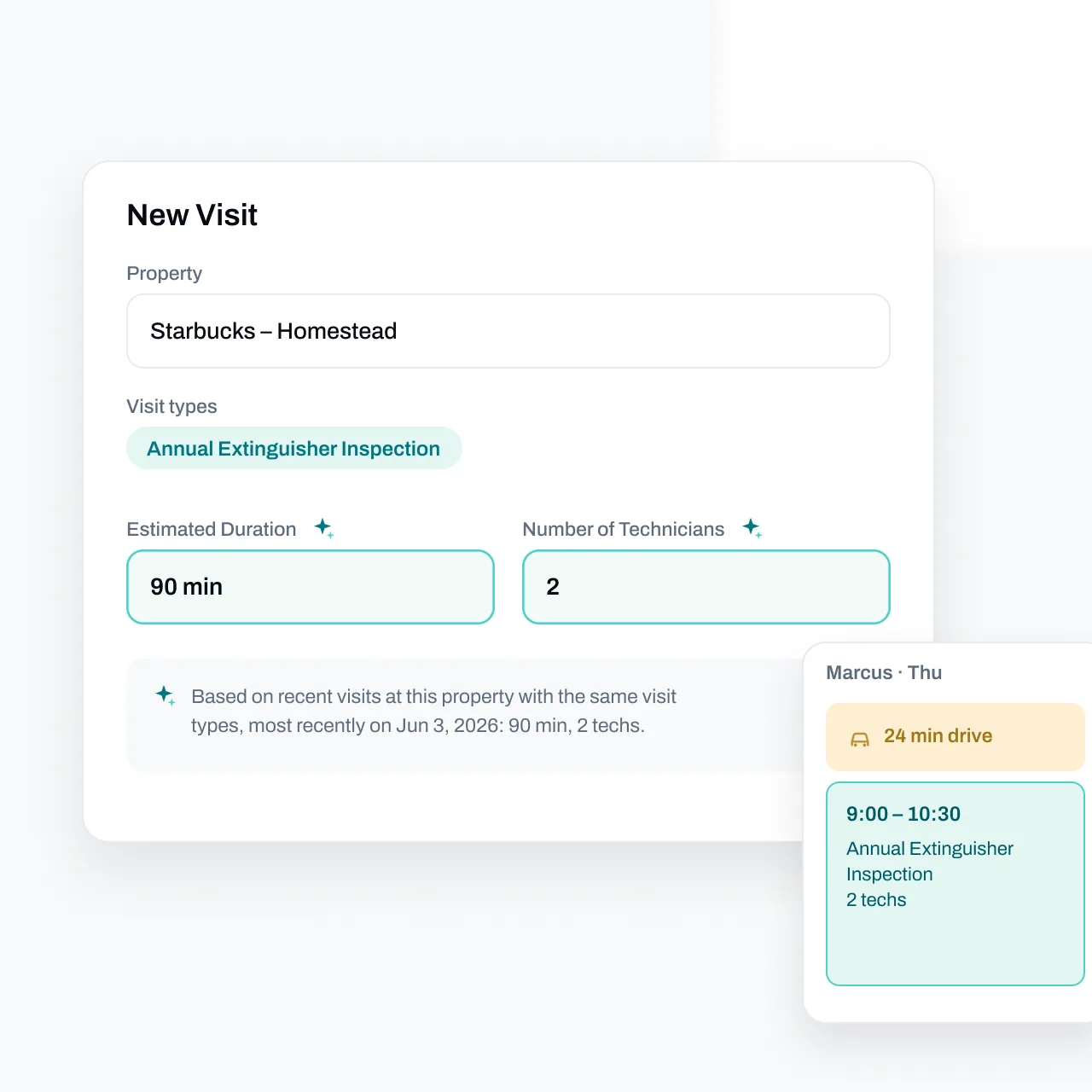
Essential offers intelligent, automated inspection due date tracking that updates dynamically based on completed work — ensuring accuracy even when services are performed earlier or later than scheduled. The platform includes commute time calculations based on real traffic patterns and allows technicians to optionally add home addresses for smarter route planning. Customized reminders can be sent automatically before technicians head to jobs, reducing no-shows and improving customer satisfaction. Learn more about Essential's scheduling capabilities.
Uptick provides route optimization to help create efficient schedules and allows recurring inspections to be scheduled in advance. Their AI Scheduler is supposed to automate job assignments, and technicians can pick up extra jobs nearby through the mobile app. However, users mention that the AI Scheduler is unusable given its limitations in how it schedules.
Verdict: Essential's automated scheduling reduces manual work and keeps inspection due dates accurate without constant oversight. The traffic-aware routing and automated reminders give Essential an edge for businesses looking to maximize technician efficiency at every size.
Ease of Use and Learning Curve
Essential is designed so a technician can open the app on day one and complete their first inspection without a training session. Screens show only the fields that matter for the job in front of you — no scrolling past dozens of optional fields to find the one you need. Office staff get the same simplicity: the workflows for quoting, invoicing, and scheduling are laid out in the order you actually do the work.
Uptick is feature-rich, but that depth comes with complexity. Reviewers on Capterra, Software Advice, and Reddit consistently describe a steep learning curve, dense screens with many fields to complete, and workflows that often require workarounds. One Reddit reviewer put it this way: "It's not broken, but nearly every solution is a workaround." Another Software Advice review notes the platform "took some time to get everything organised."
Verdict: A fire protection business — whether it's a small team or two hundred technicians — only gets value out of software when the team actually uses it. Essential's clean, role-specific UI gets technicians and office staff productive quickly at every company size.
Inspection Forms and Reports
Essential offers a full library of NFPA-compliant inspection templates covering all major fire protection systems — fire extinguishers (NFPA 10), fire alarms (NFPA 72), fire sprinklers (NFPA 25), fire doors (NFPA 80), kitchen suppression systems (NFPA 96/UL 300), emergency lights (NFPA 101), and more. The platform supports all digital form factors, working smoothly on smartphones, tablets, and any screen size. Beyond the built-in template library, Essential also supports fully custom inspection reports tailored to your specific business needs or customer requirements. Technicians only need to enter inspection results since property and asset details carry forward from previous visits — dramatically speeding up time on site.
Uptick offers inspection form templates with the ability to customize forms according to specific customer or site requirements. Drop-down lists make logging deficiencies fast in the field. Uptick also includes a floorplans feature for visual asset management.
Verdict: Essential's extensive NFPA template library combined with the flexibility to create fully custom reports gives fire protection businesses the best of both worlds — compliance-ready forms out of the box plus the ability to adapt to any customer requirement. The platform's support for all digital form factors ensures technicians can work efficiently on any device.
Quoting and Sales
Essential uses powerful AI to help generate quotes up to 10x faster than manual methods. You can write custom rules — similar to instructions for a new employee — to handle discounts, surcharges, item selection, and job-specific details. The system learns your pricing logic and applies it consistently, which scales beautifully whether you're sending five quotes a week or five hundred. Automated follow-ups via email and SMS ensure quotes don't go unnoticed, and accepted quotes convert to scheduled jobs with a single click.
Uptick enables technicians to send deficiency quotes directly from the field, and customers can approve quotes online with one click. Dedicated sales dashboards help track performance.
Verdict: Essential's AI-powered quoting with custom business rules is a real advantage for fire protection businesses with complex pricing. The ability to automate quote generation while maintaining full control over pricing logic gives Essential a significant advantage in this category.
Invoicing and Billing
Essential generates draft invoices instantly using AI, based on completed work and job details — eliminating the tedious process of manually creating invoices after every job. The system intelligently flags unbilled jobs for review to ensure you never miss revenue, and syncs cleanly with accounting software including QuickBooks Online and QuickBooks Desktop. Advanced collections automation helps manage overdue invoices, improving cash flow without adding administrative burden.
Uptick offers configurable billing options including automatic price increases and contract renewals. Bulk management of contracts and invoices keeps admin work minimal, and real-time invoice status tracking shows who has paid. Uptick integrates with QuickBooks, Xero, MYOB, and SAGE.
Verdict: Essential's AI-generated invoices and proactive collections automation can save hours of billing work each week, and the savings compound as your invoice volume grows. For US-based businesses using QuickBooks, Essential's deep integration delivers everything needed. Uptick's broader international accounting integrations may benefit businesses operating outside North America.
Customer Portal
Essential provides a full-featured customer portal where clients can view their service history, access inspection reports, approve quotes, and communicate directly with your team. The platform also includes automated customer outreach before inspections to confirm service and gather access information — reducing back-and-forth communication and ensuring technicians arrive prepared.
Uptick offers a customer portal where clients can download inspection reports, view upcoming service due dates, and approve quotes. The portal provides real-time compliance visibility for customers who want to track their fire safety status.
Verdict: Both platforms offer strong customer portals. Essential's combination of self-service capabilities plus proactive automated outreach delivers a more complete customer communication solution.
Inventory Management
Essential includes inventory management to track parts, equipment, and supplies across your business. Monitor stock levels, track usage by job, and ensure technicians have what they need before heading to the field — across one location or many.
Uptick offers inventory (stock) management to track parts and equipment, helping businesses maintain visibility into their supplies and reduce stockouts.
Verdict: Both platforms offer inventory management capabilities to help fire protection businesses track parts and supplies effectively.
Mobile App
Essential offers a full-featured mobile app for both iOS and Android, including tablets and smartphones. The app works completely offline, allowing technicians to complete inspections even in basements, warehouses, or areas with poor cell service. Data syncs automatically when connectivity is restored — no work is ever lost.
Uptick similarly provides an iOS and Android app with offline capabilities. The app is available in the Apple App Store and Google Play Store.
Verdict: Both platforms offer comparable mobile functionality with offline mode. Essential's mobile app is often reviewed as easier to use and more efficient.
See the difference live — book a 30-minute demo →
Data Migration
Switching software is only painful if the migration is painful. This is where the two platforms diverge the most.
Essential handles data migration for you — for free. Customer records, asset histories, recurring inspection schedules, and open quotes are imported by the Essential team, validated, and ready to use before you go live. The process scales with the size of your business: smaller teams are typically up and running quickly, and larger, more complex operations are migrated in a structured, phased rollout — without the months-long disruption that traditional platforms require.
Uptick customers describe migration very differently in public reviews:
- "The migration from existing database was a challenge." — Software Advice
- "Moving from our old system to Uptick was a bit slow at first and took some time to get everything organised." — Software Advice
Verdict: A bad migration is the #1 reason software rollouts fail. Essential removes that risk entirely — and the size of your data set doesn't change the price.
Ready to see how Essential migrates your data? Book a 30-minute demo →
Pricing and Implementation
Essential Pricing
Essential offers flexible month-to-month pricing with no long-term contracts or large upfront fees. This means you can start small and scale as your business grows, without being locked into an annual commitment.
Implementation and onboarding are included at no additional cost, and historical data migration is free. The Essential team handles the heavy lifting of importing your customer data, asset lists, and inspection history. Deployment is fast and scales to your team — weeks, not months — without the long, expensive onboarding traditional platforms require.
Uptick Pricing
Uptick uses a per-user monthly fee model for desk and field users, with a minimum of 5 users required. Customer and sub-contractor licenses are unlimited and free. According to G2, pricing starts at approximately $900 (though exact pricing requires contacting sales for a quote).
Onboarding typically takes 2+ months depending on team size and training requirements, and implementation may involve additional fees.
Verdict: Essential offers a significantly lower barrier to entry with free implementation, no minimum user requirements, and flexible month-to-month terms. For businesses that want to get started quickly without a major upfront investment, Essential is the clear choice.
Customer Support
Essential Support
Essential provides US-based customer support with an average response time of under 2 minutes. That's not a typo — when you have a question or issue, you get help in minutes, not hours or days. The support team is trained specifically on fire protection workflows and understands the unique challenges of the industry. Essential also offers rapid turnaround on feature requests, regularly incorporating customer feedback into platform updates.
Uptick Support
Uptick offers global customer support across its markets (US, UK, Australia, Canada). User reviews on Capterra consistently praise the support team: "Response times are quick, regardless of how small the query" and "The customer service and support from the Uptick team has been second to none."
Verdict: Both platforms receive positive marks for customer support. Essential's sub-2-minute response time and US-based team provide an advantage for businesses that need immediate assistance during their workday.
See the difference live — book a 30-minute demo →
User Reviews and Reputation
What Uptick Users Say
Positive feedback:
- "Uptick has completely changed how we work. Everyone has become ten times more efficient." — Capterra review
- "The ease of use of the software and the accuracy...they just elevate the quality of the entire service and inspection experience for the technician." — XDS Fire
- "It's almost flawless, and I can't believe I'm saying that." — Colorado Fire Services
Common concerns from users:
- "It's not broken, but nearly every solution is a workaround." — Reddit review
- "The migration from existing database was a challenge." — Software Advice review
- "Moving from our old system to Uptick was a bit slow at first and took some time to get everything organised." — Software Advice review
- "At times future development can be stuck in a queue." — Software Advice review
- Some users note the learning portal didn't always have the support documentation they needed during onboarding
What Essential Users Say
Positive feedback:
- "For years, we used an Excel spreadsheet to track inspections and a whiteboard for technician schedules. As we got busier, we knew we needed a better way to operate. After looking at many options, we chose Essential. It was the right choice for us." — Roger Lu, Owner, SAFCO
- "Essential's automated email outreach and portal allows customers to easily communicate with us. This program has made it easy to receive approvals effortlessly." — David Pulvers, Owner, All County Fire
- "Essential has streamlined our inspection workflow dramatically. What used to take us hours now takes minutes." — Capterra review
Why customers choose Essential:
- Rapid implementation — weeks, not months
- No upfront costs or long-term contracts
- AI automation that actually saves time
- Responsive US-based support
- A clean UI the team will actually use
Which Platform Is Right for You?
The honest answer: Essential is the right choice for fire protection businesses at every size. Here's why.
Small and growing businesses choose Essential because:
- Free implementation and free data migration — no five-figure onboarding bill
- Month-to-month pricing with no minimum user count
- A clean, simple UI a new technician can learn in an afternoon
- Rapid deployment — weeks, not months
Mid-sized and established businesses choose Essential because:
- AI-powered quoting, invoicing, and customer outreach scale across hundreds of jobs per week without adding admin headcount
- Fully custom inspection reports and rules-based pricing handle complex, high-volume operations
- US-based support answers in under 2 minutes — not a ticket queue
- Switching from a legacy platform is handled by the Essential team, so your team isn't pulled off billable work for months
Multi-branch and high-growth businesses choose Essential because:
- Centralized scheduling, dispatch, and inventory across locations
- Continuous platform updates based on customer feedback — not annual release cycles
- Phased migration for complex data sets, without the months-long disruption of traditional onboarding
- Flexible contracts that scale up (or down) with your business
Essential is built so that the larger you grow, the more time the platform gives back.
The Bottom Line
For fire protection businesses of every size — from small teams to multi-branch contractors — Essential is the better platform in 2026.
You get modern, AI-powered automation that saves real time. Free implementation and free data migration handled by the Essential team. Month-to-month pricing with no minimum users and no long-term contract. US-based support that answers in under 2 minutes. And a UI your team will actually use instead of working around.
Uptick is an established platform with a long feature list, but that depth comes with a steep learning curve, dense screens, a longer and costlier rollout, and migration experiences that public reviewers describe as challenging.
The fastest way to see the difference is to see Essential in action.
Frequently Asked Questions
How hard is it to switch from Uptick to Essential?
Essential includes free implementation and data migration — the team moves your customers, sites, devices, and service history for you, so you can switch without re-entering data.
Does Essential require a long-term contract?
No. Essential offers flexible month-to-month pricing with no contract lock-in.
Can Essential handle all of our service lines?
Yes. Essential supports fire extinguishers, fire alarms, fire sprinklers, fire doors, kitchen suppression systems, and emergency and exit lights — with NFPA-aligned inspection forms for each.
How quickly can my team learn Essential?
Essential is designed to be easy to learn, with a modern interface across web and mobile. Most teams are up and running quickly after onboarding — and support is there when you need it.
Still have questions? Book a demo and ask us live →
This article represents independent editorial opinions. Product details and pricing are current as of May 2026. All trademarks belong to their respective owners. Essential is compared with Uptick based on publicly available information and user feedback. No statements should be interpreted as factual claims of product defects or service failures.