
One scheduler in Essential's internal research assigned consecutive jobs about one-fifth as far apart as two randomly selected jobs at the same business. She was building nearby stops into a technician's day, even though the company served a wide area. Research method and limitations.
That's a useful standard for fire protection scheduling software: help the next person at the desk make a sensible placement, with the job's location, crew, duration, and existing appointments in view.
A calendar can show an opening. The dispatcher still needs to know whether the work fits.
What fire protection scheduling software needs to show
Before assigning a visit, put these details together: the work due at the property, customer access arrangements, the qualified technicians needed, expected duration, and travel to the surrounding stops. An empty afternoon means little if the available tech can't do that service or can't reach the property before access closes.
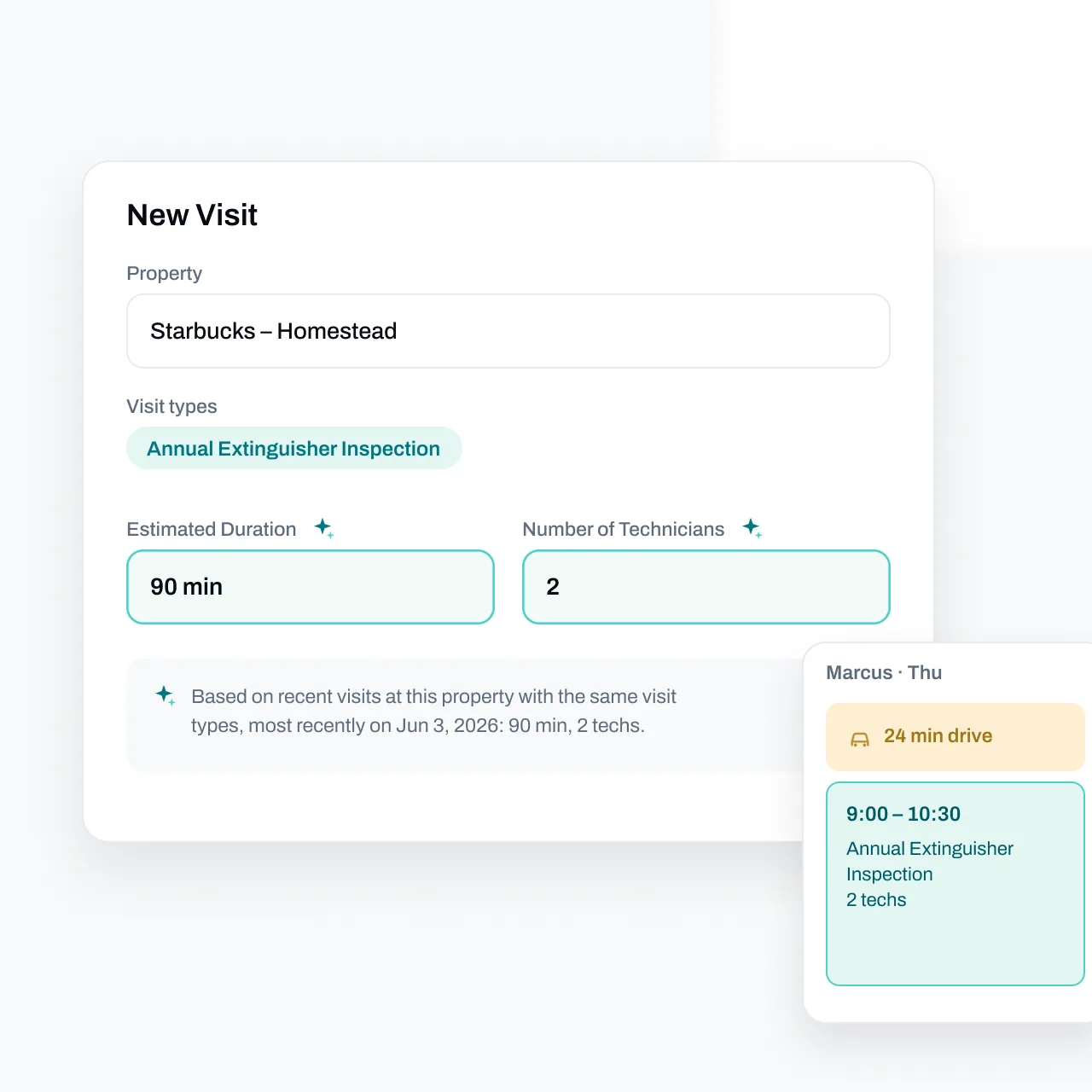
Essential's scheduling tools bring the backlog and calendar together. Google Maps estimates account for the planned day and time of travel. The office can check travel while placing the next visit.
Build a technician's day around nearby work
In the example above, 67% of consecutive placements went to the same technician. The scheduler's median booking lead was seven days, and her scheduling sessions averaged about 1.6 placements. We treated a gap longer than 30 minutes as the start of another session. These are observations about one person's workflow, not targets every dispatcher should copy. Source: Essential scheduling research.
The practical lesson is to inspect the route already taking shape before adding another job. If a technician has two visits near an industrial park, look for approved work nearby. Confirm the work scope and customer availability before offering a slot.
Build around the technician's day. Tomorrow's work may be somewhere else.
Start with fixed appointments and visits needing particular crews, then test nearby jobs against the remaining time.
Add travel on both sides of a new visit
Consider this illustrative booking decision. A technician has a morning inspection at a warehouse and a confirmed afternoon appointment at a school. A nearby customer calls to approve an extinguisher service visit.
Check the trip from the warehouse to the new stop, the work itself, and the trip onward to the school. Include access and paperwork time in the visit estimate. If the proposed stop only fits by assuming an early finish at the warehouse, you've found a fragile booking.
For a more formal check:
Added travel = travel from the previous stop to the new job + travel from the new job to the next stop − travel directly between the existing stops.
That's a comparison tool, not a promise about traffic. Use realistic departure-time estimates and keep the customer's confirmed appointment intact.
For a visit requiring a crew, check every assigned technician's availability before insertion.
Review the difficult days separately
Review the days your office spends repairing.
In our selected scheduler cohorts, several had essentially no extra straight-line distance at the median compared with the shortest order of the same stops. At the 90th percentile, four cohorts had roughly 34% to 45% extra distance; another had 14%. One small cohort had 0% at both measures. These were booked stop sequences, with two to seven visits per day. Source: Essential scheduling research.
Those figures don't measure fuel use or miles actually driven. A two-stop day also offers little information about stop-order skill. Review complicated days individually.
Look for cross-town jumps, a short job surrounded by long drives, or an insertion that pushes the last visit beyond the team's intended finish. Review days with several stops first. Check access restrictions before changing their order; the shortest route on a map may be impossible at the times customers will admit you.
Track why appointments move
Within one business, the share of placements later moved ranged from 17% to 44% across four schedulers. The measure included later reschedules, removals, and deletions by anyone. Customer requests counted too. Source: Essential scheduling research.
Use that as a prompt to investigate rework. It isn't an employee error rate.
Record a reason when a visit moves: customer availability, missing access, wrong crew, duration estimate, urgent work, or another cause. Then review repeated causes. A scheduler handling the most uncertain customers could have more moves despite making sound decisions.
For days edited by several office staff, make one person responsible for checking the whole route after a change. That's a workflow recommendation, not a causal result proven by this study. The check should cover everyone assigned, the next appointment, and who still needs to hear about the change.
Where manual calendars and spreadsheets leave extra work
Google Calendar, Outlook, a spreadsheet, or a whiteboard can hold appointment times. The office must still connect those entries to the outstanding work and property history.
-
Is this property ready to book? Check approval, access arrangements, and outstanding customer replies.
-
How long should we allow? Review previous visits and changes to the current scope.
-
Who needs to attend? Check skills, crew size, and each person's availability.
-
Does the visit fit the day? Allow for travel before and after it, plus existing commitments.
-
Has the customer been told? Check confirmation and reminder records.
Use the replacement to make these checks consistent, including when someone else covers the desk.
If you're comparing systems, our fire protection software comparison gives you a wider shortlist. Bring the same awkward booking to each demonstration.
How Essential helps everyone become a better scheduler
Experienced dispatchers often remember which property needs extra time or another pair of hands. A colleague covering the desk needs that context too.
Essential suggests visit duration and technician count from past visits at the property, with an explanation for each suggestion. Check those defaults against today's scope. Our guide to AI scheduling for fire protection shows how to evaluate the suggestion against an actual inspection.
For work waiting to be booked, inspection management tracks service intervals, customer outreach, and task status. Customer reminders and field schedule updates support the handoff after booking.
This is how Essential helps more people develop good scheduling habits: it puts remembered details and travel checks into the booking workflow. Your team checks the fit before booking.
Bring a technician's existing day and one unscheduled inspection to a 30-minute Essential demo. Work through where the visit fits, how much time to allow, and what the office needs to confirm.
Research method and limitations
Source: Essential's original internal study, “How great schedulers work: what the data says,” compiled September 30, 2026 from a September 24 snapshot. The decision-trace analysis covered 5,372 human scheduling actions recorded June 15–September 24, including placements and later changes. This article uses selected, anonymized findings from that analysis.
Route comparisons used final booked calendars and straight-line distances, without GPS or clock data. A technician-day means one technician's booked work on one date. Scheduler-level route analysis included days with two to seven visits where that person placed at least 60% of the visits; samples ranged from 15 to 109 days per scheduler. Other staff could contribute to the same day.
The findings describe associations. They don't establish individual fault, actual driving savings, customer arrival performance, or the effect of Essential's AI. None of the analyzed scheduling actions was performed by an agent. Businesses differ in geography, job mix, and how they use calendar blocks. Individual and business names are withheld.